Vbscript CGI (No… not ASP)
15 November 2007Yesterday, I don't know how, but while doing nothing I suddenly got the best idea ever: Using vbscript scripts with apache… and guess what… after some coding/debugging hours, it actually works like a charm!
so how did I manage to get this working?
Each computer with at least "windows 2000" should have cscript.exe somewhere: it's the vbscript/jscript console interpreter
so I started to write my first script:
test.vbs
#!c:\WINDOWS\system32\cscript.exe

wscript.echo "Content-type: text/html" & vbcrlf

wscript.echo "Hello World"
but it didn't work (500 Internal Server Error) so I checked apache error log and found:
C:\\wamp\\cgi-bin\\test.vbs(1, 1) Erreur de compilation Microsoft VBScript: Instruction attendue\r
Error in the first line at the first character… oh wait that's the shebang
How to ignore the first line in my vbs code?
No idea? well that's the second best idea ever: you simply need to call another vbs script from the shebang that somehow ignores the first line and include the remaining part and call it for example "vbscript_cgi.vbs":
vbscript_cgi.vbs
Set arguments = WScript.Arguments

If arguments.Count >=1 Then

Set FSO = CreateObject("Scripting.FileSystemObject")

	If FSO.FileExists(arguments(0)) Then

		Set cgi = FSO.OpenTextFile(arguments(0))

		cgi.ReadLine

		ExecuteGlobal cgi.ReadAll

		cgi.Close

	End If

	Set FSO = Nothing

End If

Set arguments = Nothing
test.vbs
#!c:\WINDOWS\system32\cscript.exe "C:\wamp\cgi-bin\vbscript_cgi.vbs"

wscript.echo "Content-type: text/html" & vbcrlf

wscript.echo "Hello World"
Nah bad luck, still error 500… apache log says malformed header from script. Bad header=Microsoft (R) Windows Script H: test.vbs … wtf?!?
Oooh right… cscript always displays a banner when you launch a script:
C:\wamp\cgi-bin>cscript test.vbs

Microsoft (R) Windows Script Host Version 5.6

Copyright (C) Microsoft Corporation 1996-2001. Tous droits réservés.
Lets add the "/nologo" switch in the shebang to avoid that:
test.vbs
#!c:\WINDOWS\system32\cscript.exe /nologo "C:\wamp\cgi-bin\vbscript_cgi.vbs"

wscript.echo "Content-type: text/html" & vbcrlf

wscript.echo "Hello World"
yayyyy it wooooooorks :D
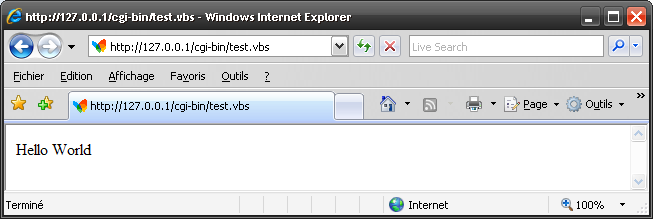
after that I added some features such as the "print" alias, GET/POST variables support, and now that's a quick example what it can do:
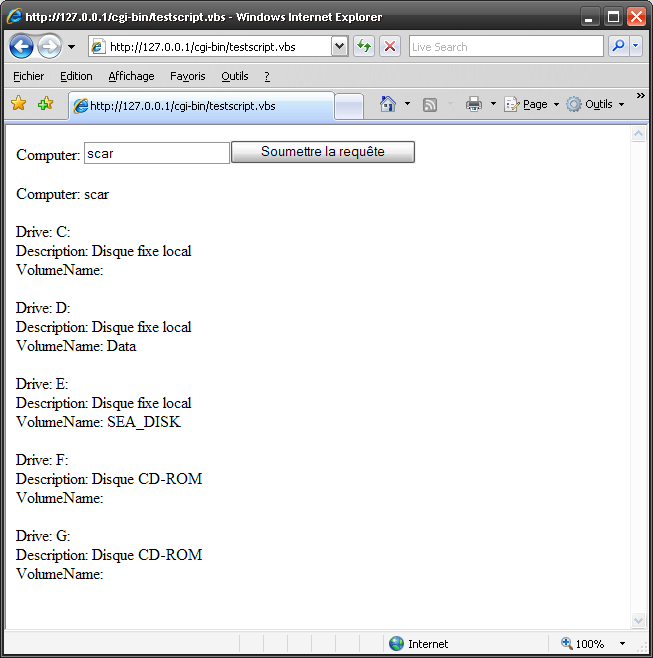
''''''''''''''''''''''''''''' vbscript_cgi.vbs '''' Kevin DEHLINGER '''' 2007 / dev.pulsed.net '''''''''''''''''''''''''''''Set arguments = WScript.ArgumentsIf arguments.Count >=1 ThenSet FSO = CreateObject("Scripting.FileSystemObject")If FSO.FileExists(arguments(0)) ThenSet cgi = FSO.OpenTextFile(arguments(0))cgi.ReadLineExecuteGlobal cgi.ReadAllcgi.CloseEnd IfSet FSO = NothingEnd IfSet arguments = Nothingsub print(v)wscript.echo vend subsub println(v)wscript.echo v & vbcrlfend subFunction GetCgiVarsSet Shell = CreateObject( "WScript.Shell" )reqmethod=Ucase( Shell.ExpandEnvironmentStrings("%REQUEST_METHOD%"))Select Case reqmethodCase "GET","HEAD"cgiinput=Shell.ExpandEnvironmentStrings("%QUERY_STRING%")& ""Case "POST"content_length=Shell.ExpandEnvironmentStrings("%CONTENT_LENGTH%")If not IsNumeric(content_length) thenprint "Content-Type: text/plain" & vbcrlfprint "No Content-Length was sent with the POST request" & vbcrlfExit FunctionEnd Ifcgiinput= WScript.StdIn.ReadAllCase Elseprint "Content-Type: text/plain" & vbcrlfprint "Unsupported REQUEST_METHOD (" & reqmethod & ")" & vbcrlfExit FunctionEnd Selectcgiinput=Replace(cgiinput,"+"," ")cgiinput=Replace(cgiinput,"&",";")cgiinput=Replace(cgiinput,"=","=;")InputArray=Split(cgiinput,";")Set CgiVars = CreateObject("Scripting.Dictionary")status=0Hash_Key=""For Each value in InputArrayIf(Mid(value,Len(value),1)="=") ThenHash_Key=Mid(value,1,Len(value)-1)ElseCgiVars.Add Unescape_Url(Hash_Key),Unescape_Url(value)End IfNextSet GetCgiVars=CgiVarsEnd FunctionFunction Unescape_Url (url)Set RegExp1 = New RegExpRegExp1.IgnoreCase = TrueRegExp1.Global = TrueRegExp1.Pattern = "%([0-9A-F]{2})"Set Matches = RegExp1.Execute(url)For Each Match in Matchesurl = Replace(url,"%" & Match,Hex2Char(Match))NextUnescape_Url=urlEnd FunctionFunction Hex2Char (hexx)Hex2Char = Chr(1*CLng("&H" & hexx))End Function
Download this code: vbscript_cgi.vbs
#!c:\WINDOWS\system32\cscript.exe /nologo "C:\wamp\cgi-bin\vbscript_cgi.vbs"'''''''''''''''''''''''''''''''' testscript.vbs '''' Kevin DEHLINGER '''' 2007 / dev.pulsed.net '''' query some data with '''' wmi/wsh (some of thecode '''' comes from scriptomatic) ''''''''''''''''''''''''''''''''print "Content-type: text/html" & vbcrlfprint "<!DOCTYPE html PUBLIC ""-//W3C//DTD HTML 4.01//EN"" \""http://www.w3.org/TR/html4/strict.dtd"">" & vbcrlf & _"<html>" & _"<head>" & _" <meta content=""text/html; charset=ISO-8859-1""" & _" http-equiv=""content-type"">" & _" <title></title>" & _"</head>" & _"<body>"Set mycgivars=GetCgiVarsif mycgivars.exists("computer") thencomputer=mycgivars.item("computer")elsecomputer = "."end ifprint "<form method=""post"" action=""testscript.vbs"" name=""test"">Computer: <input" & _" name=""computer"" value=""" & computer & """><input" & _" type=""submit""></label></form>"On Error Resume NextConst wbemFlagReturnImmediately = &h10Const wbemFlagForwardOnly = &h20println "Computer: " & computer & "<br \><br \>"Set objWMIService = GetObject("winmgmts:\\" & computer & "\root\CIMV2")Set colItems = objWMIService.ExecQuery("SELECT * FROM Win32_LogicalDisk", "WQL", _wbemFlagReturnImmediately + wbemFlagForwardOnly)For Each objItem In colItemsprintln "Drive: " & objItem.Caption & "<br \>"println "Description: " & objItem.Description & "<br \>"println "VolumeName: " & objItem.VolumeName & "<br \>"println "<br \>"Nextprint "</body></html>"Function WMIDateStringToDate(dtmDate)print dtm:WMIDateStringToDate = CDate(Mid(dtmDate, 5, 2) & "/" & _Mid(dtmDate, 7, 2) & "/" & Left(dtmDate, 4) _& " " & Mid (dtmDate, 9, 2) & ":" & Mid(dtmDate, 11, 2) & ":" & Mid(dtmDate,13, 2))End Function
Download this code: testscript.vbs
 top
top
August 21st, 2009 at 3:58 pm
Awesome! Works perfectly and replaces perl :-)
March 9th, 2010 at 5:53 am
[...] eines CGI-Scriptes. Also habe ich mich auf die Suche gemacht, wie ich ein VBScript über CGI ansprechen und ausführen kein. Dummerweise funktionierte das Codebeispiel bei mir überhaupt nicht! Eine andere Lösung [...]
August 4th, 2010 at 8:57 pm
u r tha man!!!!!